Virtual reality has a place in education when it lets learners practise a relevant action that is difficult to represent in other ways, and then demonstrate what they have learned. A headset can provide a sense of scale, access to a distant location or a scenario learners can repeat. Start with the objective and end with a test outside the experience. Feeling immersed is different from being able to remember or apply what you learned.
This guide is for teachers, vocational education providers and training managers. It compares formats, explains research findings and sets out a one-hour pilot with follow-up assessment and an explicit cost calculation.
Three things to consider
- Choose an experience based on what students need to explain, decide or do. An on-screen simulation might meet the objective.
- Measure presence and satisfaction separately from understanding, delayed recall and transfer to a new problem.
- Test the resource with your students before expanding its use. Accessibility, teacher preparation and time spent using it matter as much as the device.
How screen simulations, VR and AR differ
A simulation represents a system governed by rules. You change variables or make decisions and observe the consequences. It can run on a computer. Immersive virtual reality (VR) uses a headset to show a virtual environment that responds to movement. Augmented reality (AR) overlays information on the physical world. The W3C’s XR documentation explains these differences and the accessibility requirements they bring.
| Format | Typical activity | What to check |
|---|---|---|
| On-screen simulation | Change variables and test hypotheses | Whether the rules and feedback serve the learning objective |
| Immersive VR | Explore scale, position and perspective | Whether that perspective helps learners complete the task |
| AR | Connect information to physical objects | Whether the overlay stays anchored and leaves essential information visible |
| 360° video | Choose where to look | Whether learners can change the system or only observe it |
For example, PhET’s Circuit Construction Kit: DC lets students explore circuits without a headset. Select a circuit and a question that can show whether students have met the learning objective.
When VR can add value
Consider VR when learners need to understand spatial relationships, visit an inaccessible environment or rehearse decisions whose real-world consequences would be costly. Before choosing a resource, identify an observable action, such as locating a component, justifying a route or comparing two solutions.
Then ask what the format adds. If reading an explanation or adjusting two variables is enough, a well-designed on-screen representation may do the job. If changing the observer’s position changes what they can interpret, an immersive perspective is worth testing.
Visual fidelity alone says little about educational value. The scene needs to highlight relevant cues and let students act on them. Practice in a simulation does not establish professional competence by itself, especially when the actual job depends on touch, coordination, tools or decisions the simulation cannot reproduce.
What the research shows
Results vary with the task and the way the lesson is designed. In a 2019 experiment involving 52 university students, students reported a stronger sense of presence in a headset-based laboratory but learned less than with the on-screen version. It is an important counterexample, although one sample and one experience cannot settle the question for VR as a whole.
Other studies have found benefits. A 2022 study of 102 students aged 13 to 16 integrated a virtual visit to Greenland into six lessons on climate change. The headset group showed better immediate and delayed retention than students who watched a 2D video. The follow-up test took place about 19 days later on average. The result applies to that sequence of lessons.
In vocational education, a classroom study published in December 2024 compared two electrical engineering groups. Fourteen students took a lesson organised around VR, and 15 completed a conventional group task. The VR group gained more knowledge and understanding. The study found no difference in transfer. The small sample and the combination of activities limit how much of the gain can be attributed to the headset alone.
A 2025 trial involving 91 students compared two VR environments, one minimalist and one highly realistic. Students in the minimalist environment reported greater motivation. There was no statistically significant difference in cognitive load. The study did not compare either environment with teaching without a headset, and greater realism did not guarantee a better result. It leaves open whether simplification helps learning in other settings.
How to choose an experience
Ask for a demonstration that includes a complete task and a deliberate mistake. Look at what the learner decides, how they interpret the consequence and what they can change on a second attempt. Allow time for preparation and a debrief.
In two experiments involving 131 and 165 secondary-school students, students enjoyed VR more, but it showed no overall advantage over video. In the second experiment, acting out the procedures afterwards with physical objects improved procedural knowledge and transfer within the VR group. How the experience fits into the lesson matters.
| Criterion | Question to ask | Evidence to look for |
|---|---|---|
| Objective | What will the learner be able to do? | A task and a criterion for success |
| Format | What does the headset add over a screen? | A comparison using the same objective |
| Feedback | Does it explain the consequences? | A mistake, an explanation and a second attempt |
| Access | Who needs an adjustment or another way to complete the task? | A test of the controls, text and alternative activity |
| Assessment | Can learners apply it beyond the route they practised? | A new problem and a delayed test |
Score each criterion from 0 (not demonstrated) to 2 (demonstrated in your trial). This practical rubric has not been validated as a measurement scale. A high total score leaves an important access barrier or unclear conditions of use unresolved.
Check captions, adjustable controls, pause and exit options, and an alternative that teaches the same objective. The official Quest 3S manual covers headset fit, space, breaks and stopping if you feel unwell. Follow the instructions for the device you are using. A class timetable cannot guarantee a comfortable duration for every learner.
From experience to evidence
The headset is one part of the lesson
Follow five steps to turn a warehouse simulation into an activity you can assess.
Learning sequence
01 · Prepare
Before the simulation
What will the student have to justify, and what do they already know?
Show a simple floor plan and ask for an initial route with reasons. The aim is to interpret the constraints. Speed is irrelevant.
Record: an initial response and an observable criterion for success.
Five steps to prepare, practise and check learning.
Use Tab to select a control. Use the arrow keys, Home and End to move between steps. Playback takes 10 seconds and runs once.
A 60-minute pilot plan
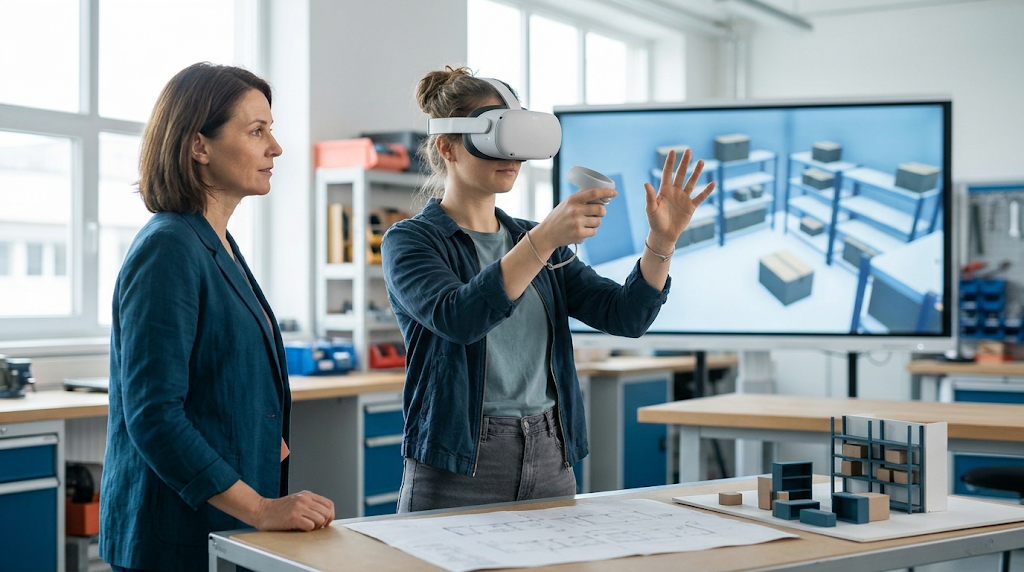
Hypothetical example: 16 adults in a vocational logistics course need to interpret a warehouse layout and justify an order-picking route. Compare eight participants using VR with eight using a screen. Give both groups the same scenario, constraints and feedback. The objective is spatial reasoning. The exercise does not assess the operation of machinery.
Before the session, prepare a scene that works in VR and on a screen, its floor plan, an order list, route constraints and a second equivalent floor plan for assessment. The template helps you compare a resource your centre has already tested. You will need to supply the VR application.
Set up four stations for each format. Students work in pairs with equal time acting and observing. Aim for comparable starting ability and allocate students randomly if feasible. The schedule sets aside teaching time. Individuals may need shorter sessions or breaks.
| Minutes | Activity | What to record |
|---|---|---|
| 0–8 | Objective and initial floor-plan task | Starting level and reasoning |
| 8–12 | Controls and familiarisation | Help and adjustments needed |
| 12–32 | 12–20: first round. 20–24: swap roles. 24–32: second round. | Decisions, feedback and problems encountered |
| 32–42 | Individual explanation and comparison | Relationships each student understands |
| 42–55 | A new warehouse layout on a common floor plan | Applying the strategy to another layout |
| 55–60 | Short questionnaire and debrief | Satisfaction, comfort and questions |
Each participant stays with their assigned format. Within each pair, students swap between acting and observing. Both formats should provide equal time in each role. Record any interruption that changes how much practice or observation someone gets. Preparing materials, setting up accounts and conducting the delayed assessment all fall outside the 60 minutes.
How to assess recall and transfer
Use this rubric for the initial task, the new scenario and an equivalent task two weeks later. Two weeks is the interval chosen for this pilot. Other settings may call for a different interval.
| Criterion | 0–1 points | 2 points | 3 points |
|---|---|---|---|
| Constraints | Misses constraints or needs help | Identifies relevant constraints | Explains their effects |
| Route | Gives little or no justification | Links the route to the conditions | Compares an alternative |
| Adaptation | Repeats the approach or changes it with help | Adjusts the strategy | Justifies a decision in a new case |
| Explanation | Lists steps without making connections | Explains the connections | Recognises limitations |
Delayed recall means retrieving knowledge after an interval. Transfer means using it in a different situation. A new floor plan tests a limited form of transfer between tasks. To assess physical application, observe another activity, such as using a scale model, and specify what it represents.
Costs and operations
Include devices, licences, adaptations, teacher preparation, support, charging, cleaning as specified by the manufacturer, replacements and assessment. Divide total cost by the number of participants who complete the activity. Counting accounts created would give a different denominator. UNESCO identifies access, teacher preparation and governance as conditions for making good use of education technology.
Illustrative costs, using hypothetical prices: at €2,200 in fixed costs and €5 per participant, 120 participants cost €2,800, or €23.33 per person. For 600 participants, the total is €5,200, or €8.67 per person, assuming the same capacity and costs. More sessions may require extra staff or licences.
Test the resource on the actual devices and browsers your centre will use. The WebXR draft specification, which describes browser access to VR and AR devices, does not establish compatibility with every combination. Also ask what data is stored. A study of 55,541 users identified known participants from movement data under specific conditions. This does not establish that every application identifies users, but it gives a reason to examine what telemetry is collected.
Before expanding your programme, use the pilot plan in this guide as a worksheet: complete the rubric, run a task and record the outcomes. You might continue with VR, redesign the activity or choose a screen. Base the decision on what students can demonstrate.
Frequently asked questions
Does virtual reality always improve learning?
No. Results depend on the task, design, participants and assessment. Some studies find a specific improvement, while others find no advantage or less learning. Measure presence and enjoyment separately.
Is a 360° video an interactive simulation?
Not necessarily. Students may be able to look around without changing variables or making decisions that have consequences. Check which actions the video allows before treating it as practice in a procedure.
How long should students spend in a headset?
There is no duration that guarantees comfort for everyone. Follow the instructions for the device and content, allow breaks, let students stop and offer another way to work towards the same objective.
How can I tell whether VR is worthwhile for my centre?
Compare equivalent tasks using VR and a simpler alternative. Record performance, delayed test results, accessibility, any problems and the cost per participant who completes the exercise. Decide in advance what results would justify keeping or expanding the programme.