A smart plug can schedule a lamp, switch a compatible appliance or measure its energy use. These are separate features. Phone control, offline operation and energy monitoring do not necessarily come together. Before choosing a brand, write down what you want to control and what should keep working if a service fails.
This guide compares documented requirements. It reports no hands-on tests or measurements of accuracy. The models illustrate features and are not ranked by performance.
Start with the appliance and its location
Check the version sold for Spain, the physical format and the manufacturer’s operating conditions. Verify the electrical rating and the types of load it supports for your particular appliance. A figure on the box cannot cover every use. If the documentation leaves a compatibility question open, ask for confirmation instead of improvising an adapter.
Measure the available space. A housing may block the next socket or make the button hard to reach. Note whether you need an indoor unit, an accessible manual control or a particular state after a power cut. Resolve those requirements before comparing apps.
Distinguish the connection, the platform and remote access
Wi-Fi provides a network connection. Matter defines how compatible accessories and controllers communicate and can use Wi-Fi or Thread. A Matter-over-Thread device needs a Thread border router. A Wi-Fi router alone does not provide that function. The Home Assistant Matter documentation explains these distinctions.
A platform logo does not guarantee that every function appears on that platform. Check switching, timers, energy readings and updates separately. The plug’s own app and an external integration may offer different controls.
For example, the Home Assistant TP-Link integration documents local communication for supported devices alongside authentication requirements and firmware differences. This does not establish account-free or fully offline operation for every product from the brand.
Power and energy measure different things
Power, usually expressed in watts, gives an instantaneous reading. Energy in kilowatt-hours accumulates over time. To compare usage across days, check what the product records, how long it keeps the data and whether you can access it outside the app.
Home Assistant explains the distinction in its documentation on energy use by individual devices. For an energy dashboard, check that the integration exposes usable entities. A number that is visible only in the manufacturer’s app may not be available to the dashboard.
For example, the Spanish Tapo P110 page advertises energy monitoring and cost estimates after you enter a tariff. The estimate depends on the readings and settings. It does not verify a bill or demonstrate the device’s measurement accuracy.
A comparison table for shortlisted plugs
Scroll to see all columns
| Need | What to check | What to verify |
|---|---|---|
| Everyday control | Physical button and available controls | Whether a phone is always necessary |
| Local automation | Integration, controller and dependencies | Whether the plug can operate without the cloud |
| Energy monitoring | Watts, kilowatt-hours and history | Whether switching also includes measurement |
| Continuity | State after restart and documented schedules | Where each timer actually runs |
Three uses that change the decision
For a reading lamp you may value manual control more than charts. To monitor a compatible appliance, prioritise cumulative energy and history. For Home Assistant, start with integration support for the exact model and firmware version.
If you later want that lamp to switch on when you enter, the sensor matters too. See how contact, motion and presence sensors differ. Buy for one task you can verify and expand once you understand the dependencies.
Where to find the products in this guide
Valinkey may earn a commission if you shop on Amazon through these links.
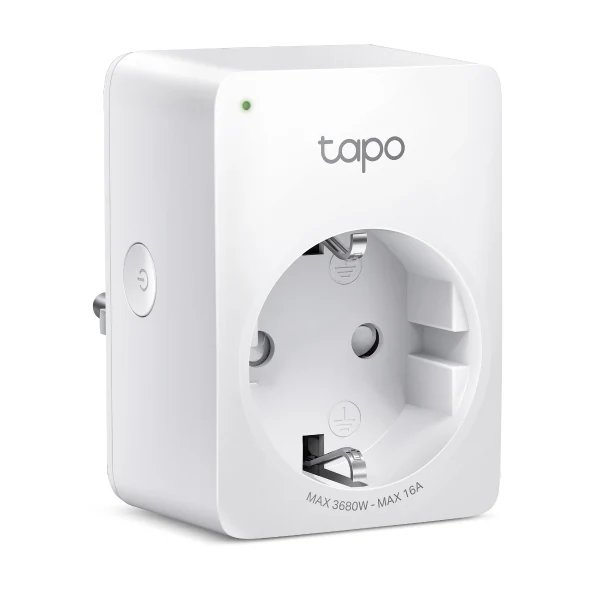
Tapo P110
Wi-Fi smart plug with energy monitoring. It needs a compatible Wi-Fi network.
Check the model, seller and current terms on Amazon.
Sources
- Tapo P110: manufacturer’s Spanish product page
- Home Assistant: TP-Link Smart Home integration
- Home Assistant: Matter
- Home Assistant: monitoring energy use by individual devices
Sources checked on 25 October 2026.